Showing posts with label application. Show all posts

Tuesday, April 24, 2012

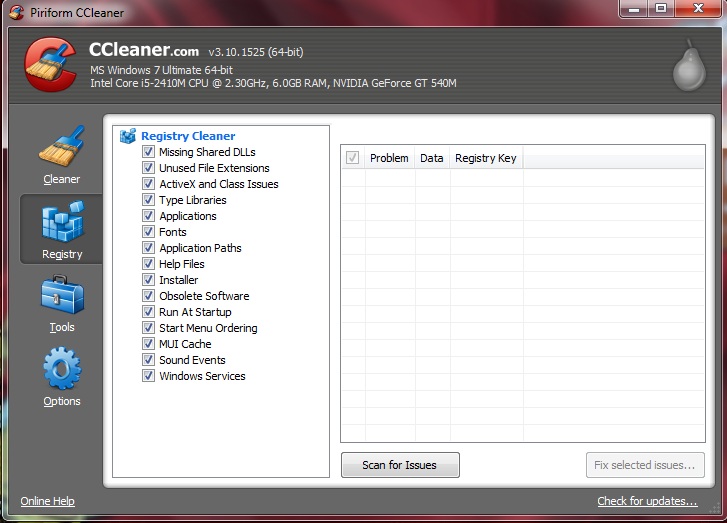
Quick Your Computer Using CCLeaner

CCleaner is a software to quick your computer. The method this tools use for make quick proccess your computer such as :

1.  Clean your browsing, and your Computer
     - You can choose what  to remove, such as history browsing, cookies browsing,temporary internet file or
        clean your recycle bin, temporary file, and memory dump, etc.
2.  Repair your registry because uninstall program or add program
     - Missing shared dll because uninstall program,clean application, font, and etc.
3.  Tools
     - This menu can can help you to uninstall program , change start up program, system restore, or wipe drive.

This simple tool is freeware too, so you can download it at here....


Friday, April 20, 2012

Avira 2012 with new theme

Avira AntiVir Personal is Freeware Antivirus. This application is only for personal use. Like most antivirus software, it is useful to scan for viruses and also runs as a background process, checking each file is opened and closed. It can detect and remove rootkits possible. He also conducts Update Through the Internet automatically every day.


This Antivirus can Detects and removes more than 150,000 viruses
Always among the winners of comparison test featured in computer journals
The resident Virus Guard serves to monitor file movements automatically, e.g. downloading of data from the internet
Scanning and repair of macro viruses
Protection against previously unknown macro viruses
Protection against trojans, worms, backdoors, jokes and other harmful programs
AntiVir protection against viruses, worms and Trojans
AntiDialer protection against expensive dialers
AntiRootkit protection against hidden rootkits
AntiPhishing protection against phishing
AntiSpyware protection against spyware and adware
NetbookSupport for laptops with low resolution
QuickRemoval eliminates viruses at the push of a button
Easy operation
Internet-Update Wizard for easy updating
Protection against previously unknown boot record viruses and master boot record viruses


Download here

Monday, April 16, 2012

Winamp with simple tool for playing music

Winamp is a media player for Windows-based PCs and Android devices, written by Nullsoft, now a subsidiary of AOL. It is proprietaryfreeware/shareware, multi-format, extensible with plug-ins and skins, and is noted for its graphical sound visualization, playlist, and media library features. Winamp was developed by American programmer Justin Frankel and Russian programmer Dmitry Boldyrev, and its popularity grew quickly, along with the developing trend of MP3 file-sharing.


Winamp supports music playback using MP3, MIDI, MOD, MPEG-1 audio layers 1 and 2, AAC, M4A, FLAC, WAV and WMA. Winamp was one of the first common music players on Windows to support playback of Ogg Vorbis by default. It supports gapless playback for MP3 and AAC, and ReplayGain for volume leveling across tracks. CD support includes playing and import music from audio CDs, optionally with CD-Text, and burning music to CDs. The standard version limits maximum burn speed and datarate; the "Pro" version removes these limitations.
Winamp supports playback of Windows Media Video and Nullsoft Streaming Video. For MPEG Video, AVI and other unsupported video types, Winamp uses Microsoft's DirectShow API for playback, allowing playback of most of the video formats supported by Windows Media Player. 5.1 Surround sound is supported where formats and decoders allow.

winamp is freeware so you can download without worrying about it. Here link for download it.

Download here


Yumi Multiboot USB Creator


YUMI (Your Universal Multiboot Installer), is application used to create a Multiboot USB Flash Drive containing multiple operating systems, antivirus utilities, disc cloning, diagnostic tools, and more. Contrary to MultiBootISO's which used grub to boot ISO files directly from USB, YUMI uses syslinux to boot extracted distributions stored on the USB device, and reverts to using grub to Boot Multiple ISO files from USB, if necessary. Aside from a few distributions, all files are stored within the Multiboot folder, making for a nicely organized Multiboot Drive that can still be used for other storage purposes.

This YUMI tool is really to use,and with this tool we don't need grub4dos or anything like that. Because it's auto insert in there from YUMI. YUMI can also make recovery software such as acronis and hiren for emergency using....

Step by step using YUMI :


Dowload

Leave Comment

HTML Comment Box is loading comments...